Sports hiring, built as one workflow
See the whole product, end to end
The six films below each cover one step. This one runs the entire walkthrough in order, from the opening sequence through every stage of the hiring workflow.
Already running a job ad
Point Hirello at the ad you are already running, or drop in the job spec document, and the setup wizard fills itself in. You check it rather than retype it.
Why start with sports hiring
Sports jobs are Hirello’s defined starting point. Hirello Classic gives employers a sports job ad and candidate management in one product.
Hirello Express provides the same candidate-management flow when the employer already has a job ad. The evidence for choosing sports hiring as the initial market is [[FACT: product or market evidence explaining why sports hiring was chosen as the initial focus]].
Defined category
Hirello Classic is explicitly built around sports job ads.
Two entry routes
Employers can start with a Hirello job ad or bring an existing advert.
Market evidence
[[FACT: evidence of demand from sports employers, clubs or hiring teams]]
What is already built
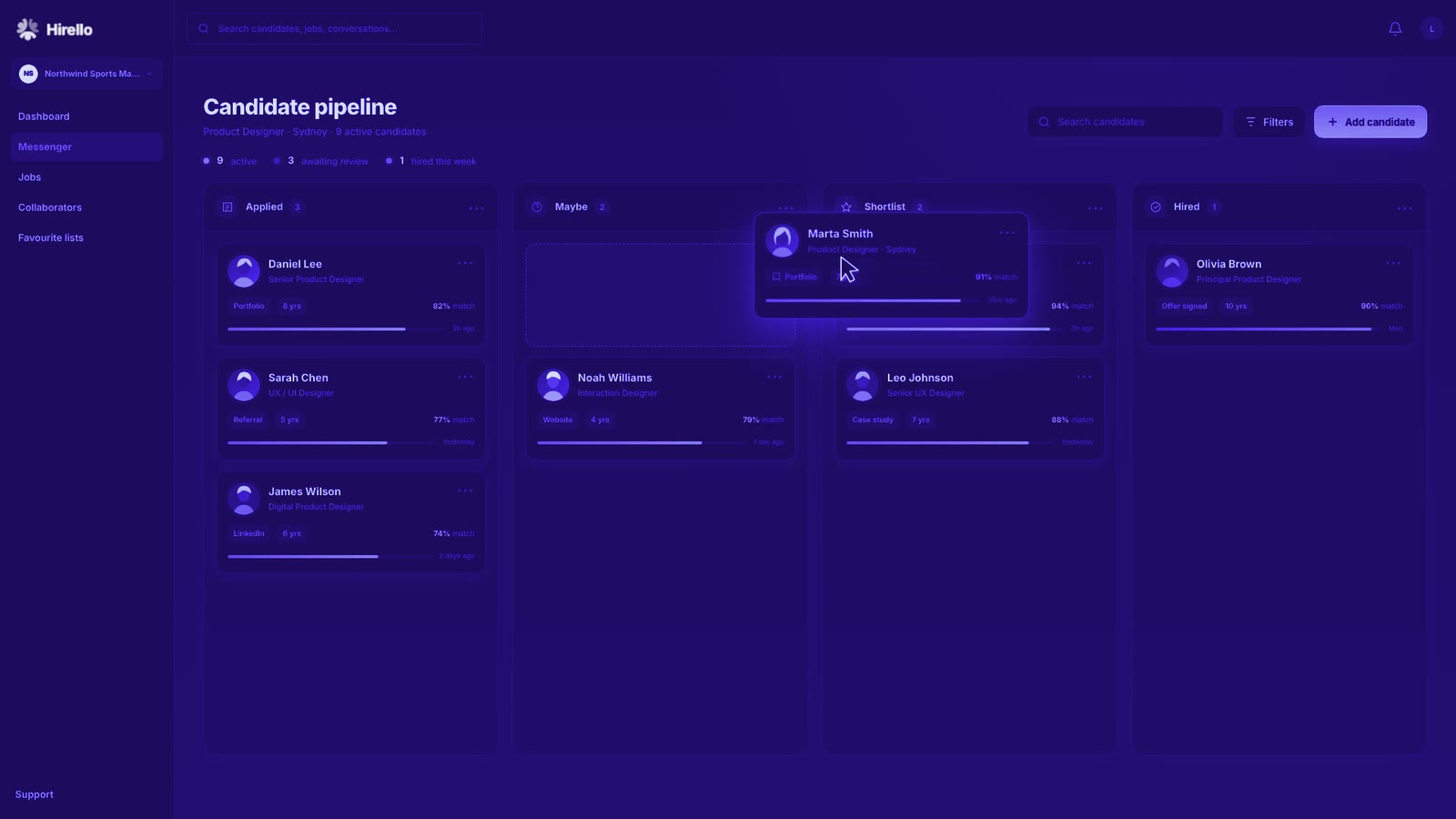
The product walkthrough demonstrates application import, screening questionnaires, JobScore, interview scheduling, ranking and selection-panel collaboration. Each step uses the same job and candidate records.
Hirello Classic and Hirello Express present this candidate-management flow at different entry points. The walkthrough is evidence of the product interactions, not evidence of commercial traction.
Application intake
CV import, parsing progress and the candidate board are demonstrated.
Assessment flow
Questionnaires, answers, flags, JobScore and ranking are demonstrated.
Team workflow
Interview invitations, candidate slot selection and panel participation are demonstrated.
Application management made easy
CVs and cover letters arrive as files. Until they sit in one candidate board, the employer still has an intake job to do. Hirello accepts dropped files, shows the parsing progress and creates candidate records in the Applied stage.
The import leads straight into JobScore. Intake and assessment form one connected sequence, using the same candidate records.
Drag and drop
Add CVs and cover letters to the role in one action.
Visible progress
See each application move from text extraction to a parsed candidate record.
Ready to review
Imported candidates appear together in the Applied stage.
Spot high-fit candidates faster
A large applicant pool makes it difficult to decide where to start. JobScore scores each candidate against the job when their application is parsed and places the result beside their name.
JobScore reads the whole application and surfaces the factors behind the score. It does not rank candidates or choose a winner, so the hiring decision stays with people.
Job-specific score
Each score reflects the candidate’s fit for the role being filled.
Whole application
JobScore considers the application rather than relying on one CV line.
Human decision
The score informs review without deciding the final order.
Screen high-fit applicants first
A CV does not answer every role requirement. Hirello lets the employer build a questionnaire, add answer choices and collect responses from the candidate.
Answers return to the candidate’s profile. Screening rules can flag a response for closer review or screen a candidate out, while keeping the evidence attached to the record.
Build questions
Create the questionnaire and answer choices inside the hiring flow.
Answers attached
Candidate responses appear on the relevant profile.
Review flags
Use answers to identify applications that need closer attention.
Scheduling of candidate interviews
Interview scheduling slows down when shortlisted candidates have different availability or live in different time zones. Hirello shows the shared availability, lets the employer set the interview window and sends the invitations.
Candidates choose from the available times in their own time zone. Their confirmed slots and replies remain connected to the job.
Shared overlap
See the interview times that work across the shortlist.
Candidate choice
Each candidate selects a suitable available slot.
Confirmed schedule
Locked interview times return to the employer’s hiring view.
Select with confidence
A shortlist still needs a clear decision process. Hirello places shortlisted candidates in one comparison view, keeps JobScore visible and lets each reviewer arrange their preferred order.
The reviewer submits a ranking rather than accepting an automatic recommendation. This keeps the product’s assessment signal separate from the final human judgement.
Compare finalists
Review shortlisted candidates in the same view.
Set your order
Drag candidates into a personal ranking before submitting it.
Clear deadline
A visible timer shows when the ranking is due.
Collaborate seamlessly
Hiring decisions often involve people with different responsibilities. Hirello lets the employer invite a selection panel member with job ad approval only or with access to score, comment and rank candidates.
Submitted rankings appear in the shared selection view. The displayed average uses the reviewers who submitted, while each score and comment stays connected to the job.
Defined access
Choose approval-only access or full panel membership.
Shared evidence
Panel members review the same candidates and JobScores.
Recorded input
Rankings, scores and comments remain with the hiring process.
Evidence so far, and next
The current product evidence is the working walkthrough. Commercial traction needs to be stated separately: [[FACT: current employer users, active hiring organisations or paid customers, using the metric Hirello actually tracks]].
The next product or commercial milestone is [[FACT: next confirmed milestone]]. The next investor update will report [[FACT: metric that will be used to measure progress towards that milestone]].
Employer use
[[FACT: current number and definition of employers using Hirello]]
Commercial signal
[[FACT: current revenue, paid contracts, pilots or another verified commercial measure]]
Next milestone
[[FACT: next product, customer or commercial milestone and its target date]]
Investor questions
- What does Hirello offer employers?
- Hirello Classic combines a sports job ad with candidate management. Hirello Express is for employers who already have a job ad and want Hirello to manage candidates after it.
- Why focus on sports hiring?
- Sports jobs are the defined starting point for Hirello Classic. The evidence for this choice is [[FACT: verified product, buyer or market evidence supporting sports hiring as the initial focus]].
- How does JobScore work?
- JobScore scores each candidate against the job after the application is parsed. It reads the whole application, surfaces the evidence and does not rank or select candidates.
- How do hiring teams work together?
- An employer can invite a selection panel member with job ad approval only or with full panel access. Full panel members can score, comment and rank candidates, with their submitted input recorded in the shared hiring view.
- What is available today?
- The walkthrough demonstrates CV import, screening questionnaires, JobScore, interview scheduling, ranking and selection-panel collaboration. The current production status is [[FACT: production status, supported users and availability of Hirello Classic and Hirello Express]].
- What traction and business model has Hirello established?
- Current traction is [[FACT: verified employer adoption, product usage and retention evidence]]. The business model is [[FACT: pricing, contract structure and revenue model for Hirello Classic and Hirello Express]].
Get in touch
Request a call back to discuss the product walkthrough, the current evidence and the next milestone.
Request call back